Song appearance
Make songs comfortable to read on your own screen: background colour, and separate colours, fonts and sizes for lyrics and chords. Changes apply only to your screen; other musicians keep their own appearance.
Open Song appearance
- In Live, tap the song to open Live controls.
- Choose Song appearance. The Live preview at the top shows your changes straight away.
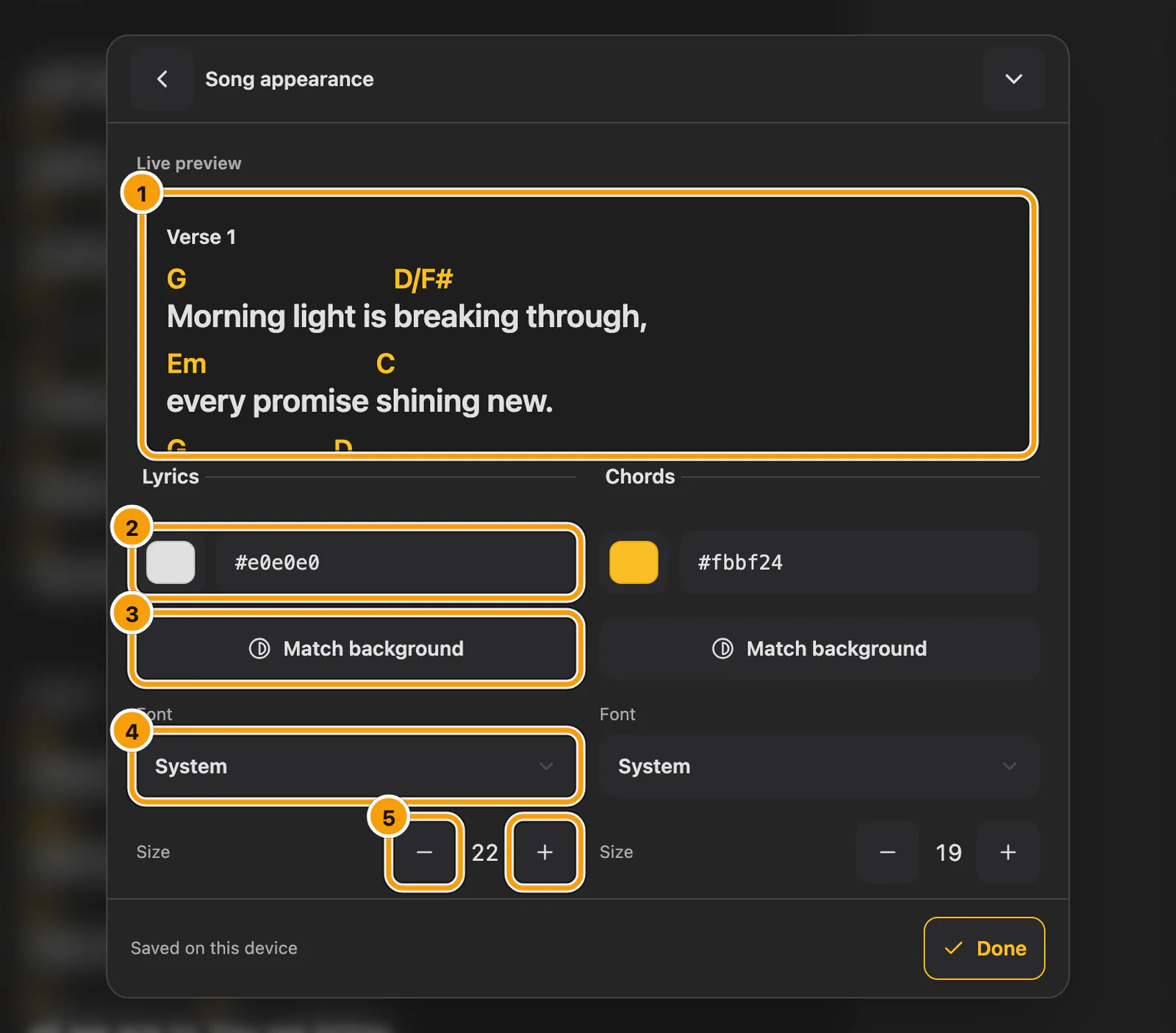
① Live preview · ② Lyrics colour · ③ Match background · ④ Font · ⑤ Size
Change colours, fonts and sizes
- Choose a Background colour, and colours for lyrics and chords.
- Tap a colour swatch to pick a colour, or type its code, such as
#e0e0e0. - Choose a font and size separately for Lyrics and Chords.
- Match background under Lyrics or Chords chooses black or white, whichever gives the strongest contrast against your current background. Each colour stays independently editable and is saved with your appearance.
Changes save automatically, so closing never discards your appearance.
Reading preferences in the same panel
Song appearance also holds the choices you set once and then leave:
- Show my marks: turn it off to read the clean song. Hiding never deletes marks.
- 1 column or 2 columns on tablets and computers.
- A–Z list: Automatic, Left or Right for the edge letters you drag to browse songs.
- Text size is also available here on a phone whenever it is not in the top bar.
- Nashville numbers: read chord degrees relative to the displayed key. The song and personal marks stay attached to the same places. When the key is unknown, chord names remain visible.
- Music tools: enable the optional Live music controls, microphone listening, accompaniment, recordings or chart creation. These choices belong to this device.
Where your appearance is saved
Your appearance saves automatically on this device and, when you are signed in, in your account. Account settings load on another signed-in device. Changes made offline retry when you reconnect. If sync fails, your local changes remain available and Try again is offered.
Reset appearance restores the colours, fonts and sizes without changing your lyrics/chords choice.